

Table of Contents
In 2025, QR codes have evolved from casual conveniences to essential networking tools. Whether you’re at a conference, coffee shop, or on a Zoom call, your CloudCard QR code is your gateway to sharing your digital business card instantly and professionally.
According to QR Code Statistics, around 84% of mobile users have scanned a QR code at least once. Making it exteremly important on how we connect in this digital age.
But are you using your QR code to its full potential?
Consistent presence ensures that your contact information is always just a scan away, regardless of the platform. Here are nine clever and effective ways to use your QR code, and how CloudCard makes each one seamless and smart.
Print It and Display It in a Clear Perpex Stand
Attending a trade show, pop-up, or open event? Print your CloudCard QR code and pop it into a clear acrylic (perpex) stand on your table or reception desk. This makes it effortless for people to scan without needing to interrupt you, ask for a card, or take a brochure.
Pro tip: Add a short CTA like “Scan to Connect” or “Get My Digital Card” to encourage action.
Put Your QR Code on a Lanyard Badge
Wearing your QR code means it travels with you. Printing it on your event lanyard or name badge makes networking smooth and contactless especially useful at conferences or networking mixers where first impressions matter.
Pro tip: Combine it with your name and title for a double impact.
Save Your QR Code in Your Phone’s Photo Gallery
Save your CloudCard QR code as a photo in your phone’s gallery so you can pull it up instantly, anytime, anywhere.
Pro tip: Make it your phone’s lock screen during events for ultra-fast sharing.
Add It to Marketing Materials
Whether you’re printing flyers, brochures, banners, or packaging, your QR code can do more than just look good, it can connect your audience to your full digital identity. With CloudCard, they’ll get instant access to your contact info, website, social links, and more.
Pro tip: Great for product packaging, leave-behinds, or takeaway bags.
Use It in Your Social Media Bios and Posts
Your LinkedIn bio. Your Instagram story highlights. Even your Facebook cover photo. These are all ideal places to drop your QR code (or the link behind it). CloudCard’s QR code leads to your full digital business card, so you’re turning every impression into a potential lead.
Pro tip: You can even post it on threads or tweets!
Activate Offline Mode for No-Internet Sharing
CloudCard has a genius offline toggle so even if you’re in a dead-zone or off the grid, people can still scan your QR code and access a cached version of your card. Perfect for networking when networks are slow at events, underground venues, or when you’ve got no data.
Pro Tip: Just toggle “Offline Mode” before your event and you’re good to go.
How to activate your Offline Mode on your CloudCard Digital Business Card:
- Open your CloudCard digital business card
- Click on your QR code at the bottom of your card
- Your QR code will then display
- Move the toggle at the bottom to “Offline”
Include It in Your Email Signature
Every email you send is a missed opportunity if you’re not including your QR code. With CloudCard, you can embed your scannable code in your signature, making it easy for recipients to connect with you beyond the inbox.
Pro tip: Add “Scan to save my contact info” so receipents know what the QR code is for.
Use It on Presentation Slides or Virtual Backgrounds
If you’re speaking at a webinar or giving a presentation, drop your QR code onto your intro or outro slide. Better yet, set it as your virtual background on Zoom or Teams. It’s a subtle way to make every viewer a connection opportunity.
Pro tip: “Scan to connect” beats “Any questions?” every time.
Carry a NFC Business Card with Your QR Code on the Back
Here’s where tech meets tactile.
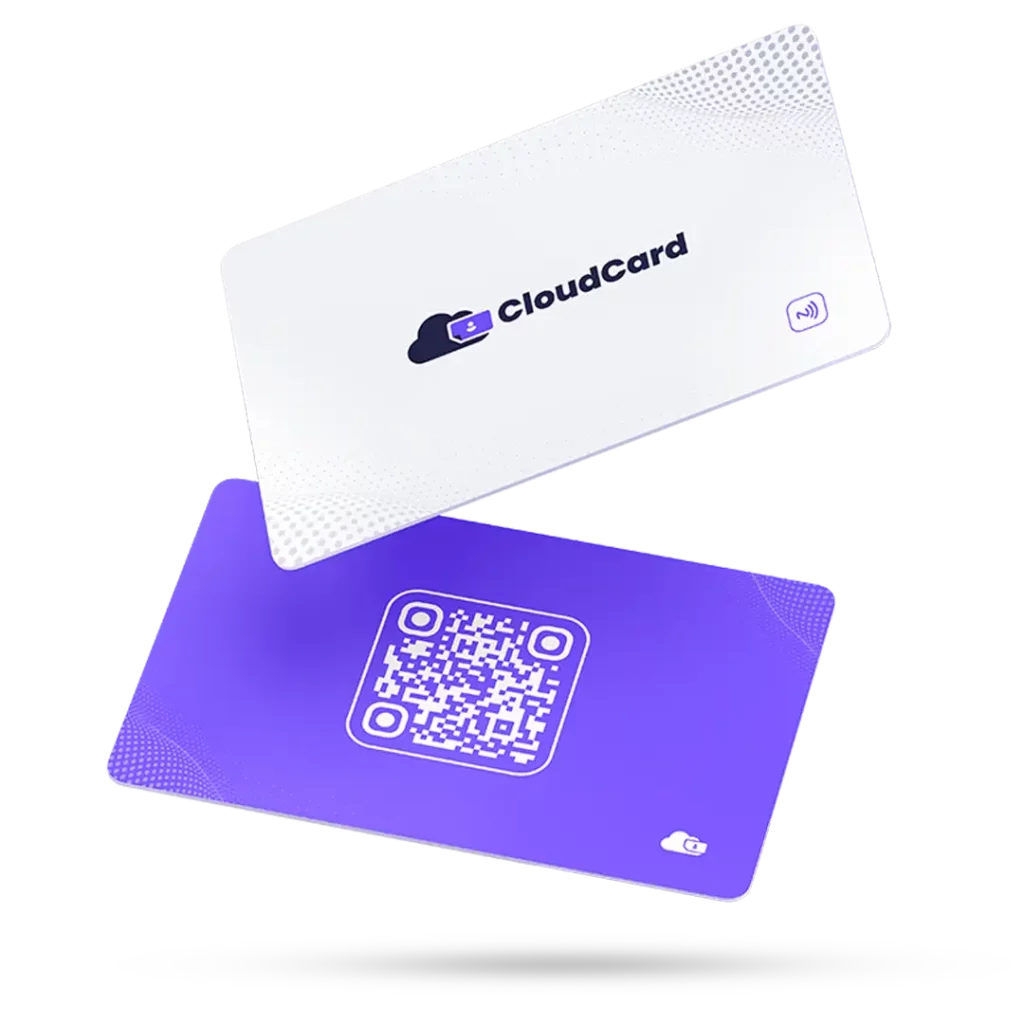
With CloudCard, you can order an NFC-enabled business card that lets people tap their phone on your card to access your digital profile instantly. And on the reverse side? Your CloudCard QR code—just in case they prefer to scan instead.
Why this combo works:
- NFC gives you that “wow” factor and instant contact transfer.
- QR is universal and works on any phone—even older models.
- You’ll always have a backup method if NFC doesn’t trigger.
QR codes aren’t just square graphics, they’re powerful networking tools. With CloudCard, you can use your QR code to drive real connections, streamline your follow-ups, and future-proof your professional identity.

